CSS11 min
How to Debug CSS Problems: A Practical Developer's Guide
Why your style isn't applying, what's causing the horizontal scrollbar, and how to work out which rule actually won. A methodical approach to CSS bugs.
Read articleInspect, debug, modify, test and audit any page from a single keyboard-friendly popup. A genuinely comprehensive toolkit — every tool runs privately in your browser.
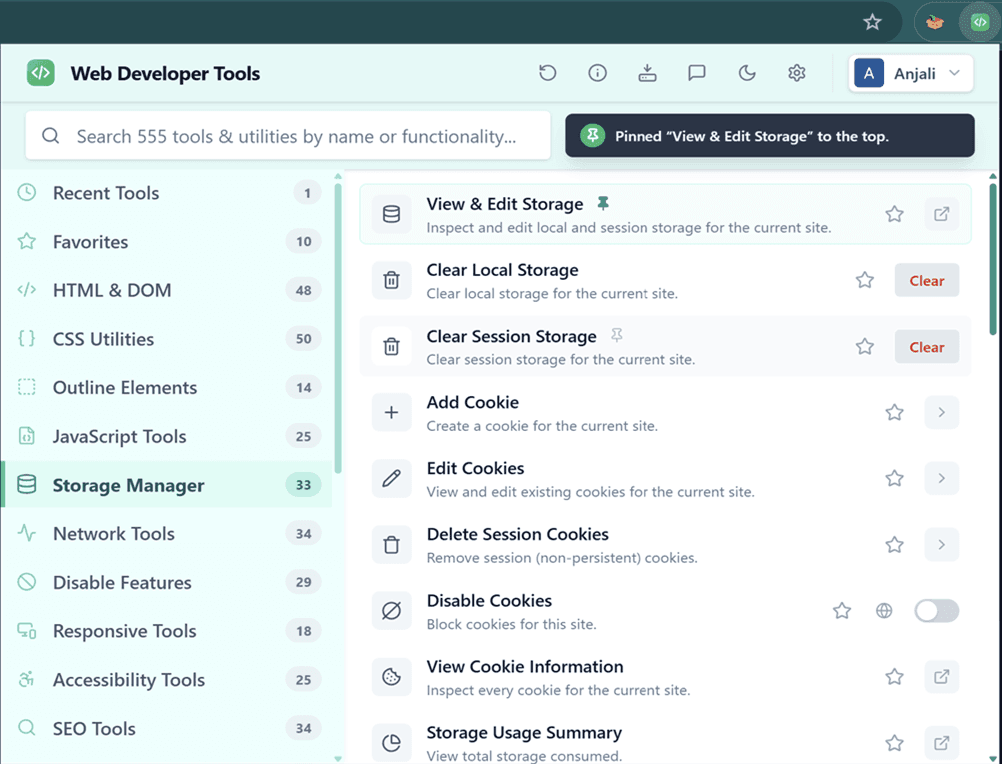
A few of the 22 categories inside
0 individual utilities, grouped into 22 categories. Search below — the same way you would inside the extension.
Showing all 22 categories
Toggle stylesheets, swap the box model, and live-edit CSS.
Read element metadata, IDs, classes, ARIA roles and structure.
Format, validate and convert JSON, XML, YAML, CSV and Base64.
Audit metadata, canonicals, hreflang and structured data.
Inspect response headers, bodies, status codes and resource sizes.
View and edit cookies, localStorage, sessionStorage and IndexedDB.
Generate placeholder text, test regex, count and transform text.
Switch off JavaScript, images, fonts, animations and more per site.
Pick colors, extract palettes and inspect type and spacing.
Detect frameworks, list scripts, find listeners and console errors.
Reveal alt text and dimensions, and find broken or missing-alt images.
Flag missing labels and ARIA, low contrast, and simulate color vision.
Validate HTML/CSS, edit CSS live, and export reports.
Review CSP, HSTS, referrer policy and other security headers.
Populate and clear fields, reveal passwords and flag missing labels.
Pick pixel colors, measure with rulers and guides, clear cache.
Resize the viewport and inspect media queries and pixel ratio.
Analyze DOM size, resource counts and render-blocking assets.
Outline blocks, headings, tables, iframes and positioned elements.
Validate manifests, check installability and service workers.
Identify frameworks, CMS platforms, analytics, CDNs and more.
Browse every CSS, JS, image, font and iframe the page loads.
No configuration and no account. It works on every tab the moment it's installed.
Click the toolbar icon or hit the shortcut. The popup opens on top of the current tab — no DevTools, no context switch.
Type what you need across all 555 tools, or browse the category sidebar. Recent and favorite tools stay one click away.
Toggle a tool on, run a one-shot action, or open a live editor. A badge shows how many tools are active on the tab.
Auditing tools open searchable reports — headers, CSS, images, outline, colors — in a dedicated panel you can export.
The toolkit isn't a pile of buttons. Every utility maps to something you actually do — from first inspection to final optimization pass.
See how any page is built.
A representative sample — each workflow draws on dozens more tools inside the extension.
Open the Pro CSS Editor and rewrite styles against the real DOM, then flip whole stylesheets off, swap to the border-box model, or force system fonts to see structure underneath. Nothing is permanent; reload to reset.
.card {
  border-radius: 4px;
  box-sizing: border-box;
  box-shadow: 0 1px 2px rgba(0,0,0,.06);
}Auditing tools don't just flash a color on the page — they open a searchable, exportable report. Review security headers, SEO metadata, accessibility issues, the document outline and response headers side by side.
Read and edit cookies, localStorage, sessionStorage, IndexedDB and Cache Storage in one manager. Copy any response body, inspect headers, and check status codes without opening a separate tool.
| session_id | a3f9…c1 | HttpOnly |
| theme | dark | — |
| _ga | GA1.2.88… | Analytics |
The breadth means the same extension covers the whole team — no hunting for five different add-ons.
Inspect the DOM, edit CSS live, and read every request the page makes.
Sample exact colors, extract palettes, and check type and spacing.
Resize viewports, populate forms, and reset page state fast.
Surface missing labels, weak contrast, and color-vision issues.
Validate metadata, canonicals, structured data and hreflang.
Practical write-ups on the work the toolkit is built for, useful whether or not you install anything.
No Ads
No ad networks bundled in.
No Tracking
Zero analytics or telemetry.
No Data Selling
Your data is never sold.
No Login Required
Every tool works with no account.
Local Processing
Inspection runs in your browser.
No Remote Code
Everything ships bundled.
Transparent Permissions
Each one maps to a tool.
Optional Pro Sign-In
Never needed for the toolkit.
Local Report Exports
Audit reports save to your device only.
Your pages never leave your browser without permission.
Web Developer Tools was built privacy-first from day one. There are no accounts and no network calls except the ones you explicitly trigger.
chrome.storage — never your browsing data.Every utility across 22 categories, free and on-device. Add it to your browser and it's ready on the next tab you open.
No sign-up · No tracking · Works on Chrome, Edge, Brave & other Chromium browsers